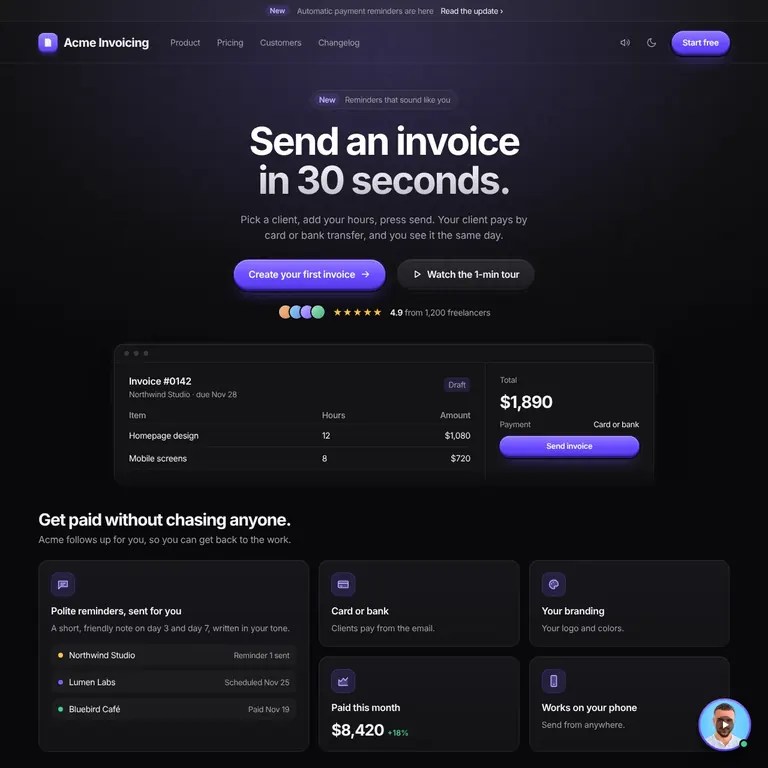
You built it fast. It works. Then you open it next to a real product and something feels off: the purple gradient, the three little cards, the glow. Visitors notice it before they read a word. These prompts fix that, one step at a time, without rebuilding anything.
Money-back guarantee. Not happy with the book? Full refund, no questions.
27 prompts, one per step
DESIGN.md rules file included
Bonus: motion and UX principles prompts
Bonus: a private video of me fixing a real AI build, live
No design skills needed. Nothing gets rebuilt
First AI draftAfter the book
Works with whatever you built it in
Before and after
Same app. Same features. Better design decisions. Four sample products in four niches. Left is the first AI draft, breaking every rule in DESIGN.md. Right is the same screen with the rules applied. Drag to compare.
Sample products made for this page with fictional brands.
Sound familiar?
You hesitate before sharing the link.You shipped it. You're proud of it. Something still feels off.
"Make it look better" added another gradient.The AI tries. It just doesn't know what better means.
It looks like every other AI-built site.And you can't quite say why.
It's 1 a.m. The app works. Then you open it next to Linear or Stripe, and yours suddenly looks like a template.
I've been there. I've designed products for 10 years, and I build my own with Claude and Cursor. They hand me the same purple, glowing first drafts they hand you. The difference is I know what to ask for next.
So I wrote down the rules I use with clients, turned each one into a copy-paste prompt, and explained why it works. That's this book.
When you buy the book, you also get a private video. For 15 to 30 minutes I take a page built with AI and turn it into a real product, live on screen. No cuts, no tricks.
See which prompt I run first, and why
Hear how I decide what stays and what goes
Pause and copy my steps on your own project
Test yourself: score the page with me before and after
It is the closest thing to sitting next to me while I work. You learn how I think, not just what I type.
Private video · 15 to 30 minFrom AI first draft to a real product
Two full prompts from the book, exactly as they are inside. Copy one, paste it into Claude, Cursor, Lovable or v0, and judge the quality yourself.
Prompt 1
Audit your colors
Audit the colors on this page. Do not change anything yet. List every color you find as a hex value, with where it is used and how many times. Then group them: backgrounds, surfaces, borders, text, accents, and status colors. Flag every gradient, every color used only once, every pair of colors that do the same job, and every color that carries meaning on its own with no label or icon. Check each text color against its background and list any pair under 4.5 to 1 contrast. Work out the split between neutral, secondary and accent colors and compare it with 60-30-10. Finish with one line: how many colors the page uses now, and how many it needs. Follow these UX laws: 60-30-10 color rule, Von Restorff effect, Contrast minimum (WCAG 1.4.3) and Color is not the only signal (WCAG 1.4.1).
Prompt 18
Say what it does in ten words
Rewrite the top of the page. One headline under 10 words that says what this does and who it is for. One sentence under it that says how. One main button that names the first thing the visitor does. Remove any second button. Show a real screenshot of the product. Follow these UX laws: Hick's law, Focal point, Inverted pyramid and Serial position effect.
Liked these? There are 25 more inside, plus DESIGN.md and the private video.
Your first 30 minutes
This is the quick start. Open your app, open the book, and follow it. Most of the change shows up here. The full 27 steps take about an hour per page when you want to go further.
0 to 5 minAudit your colorsRun prompt 1. The AI lists every color and what to cut, without changing anything yet.
5 to 10 minSet your rulesFill in DESIGN.md with prompt 15, so your AI uses one gray base and one accent from now on.
10 to 20 minFix type and spacingPrompts 16 and 17: four text sizes and one spacing scale. This is the biggest jump.
20 to 25 minRewrite the heroPrompt 18: one clear headline, one sentence, one button.
25 to 30 minRate itPrompt 27 and the scorecard. Fix the lowest score, then run it again.
What's inside
Four parts, in the order you use them. Start at step 1 and finish with a page that scores 10 out of 10.
Steps 1 to 8
Spot it
Eight tells that make a page look AI-made, each with a prompt that finds it for you.
Steps 9 to 14
Set up
Six prompting habits: one section at a time, a full reference link, a screenshot, three clear lines.
Steps 15 to 25
Fix it
Eleven fixes for color, type, spacing, hero, cards, icons, surfaces, copy, states, proof and mobile.
Steps 26 and 27
Keep it fixed
A DESIGN.md rules file and a rating loop you run until the page scores 10 out of 10.
Why this book is different
I started with prompt packs too. Paste, get a nicer page, move on. Then the next page looked just as AI-made, and I had no idea why. The fix was not a better prompt. It was knowing the rules behind it.
So this book does not just hand you prompts. It teaches you why each fix works, so you can repeat it on anything you build.
Prompt packs
Paste it and hope it works
Fixes the page you pasted it on
You cannot tell when the AI gets it wrong
Stuck the moment it breaks
This book
Every step explains what changes and why
Principles you reuse on every project
You check the result before you accept it
You tune the rules to your own taste
Learn it once, use it anywhere
Mobile apps
Web apps
SaaS dashboards
Marketing sites
Landing pages
Mac apps
Desktop apps
Books
Articles
When you know what is happening, you trust the result, you feel when something is off, and you can make it your own. Learn the principles and how to use AI properly, and there is not much you cannot build.
A system, not a pile of prompts
Prompts fix a page once. This is a loop you can run on every page you build.
1Rules
DESIGN.md gives your AI your spacing, colors, type, icons and copy rules, so it stops guessing.
DESIGN.md
2Fix
27 copy-paste prompts, plus the motion and UX principles prompts. Each says why it works and what to check.
PROMPTS.md
3Rate
The scorecard rates your page out of 10 and shows exactly what still looks generated.
SCORECARD.md
4Re-run
Fix the lowest scores, rate again, repeat until it earns a 10. Then run it on the next page.
Loop
All 27 steps
Part 1 · Steps 1 to 8
Spot it
Find what makes the page look AI-made
01Look for the purple to blue gradientList every color and what it is used for. Ten or more with no pattern is the tell.
02Count identical icon cardsThree matching cards with an icon, two words and a sentence say nothing specific.
03Search for emoji used as iconsScan feature lists, pricing tiers and buttons. Newer models do it less, but still do.
04Read your headline out loudSay it to someone new and ask what you sell. If they can't tell, it is filler.
05Look for glow and neonColored glows, neon outlines and heavy shadows look like effort and read as clutter.
06Measure three gapsWrite down the space between three pairs of sections. Uneven gaps are felt, not named.
07Find the abstract shapesIs the main image your product, or a blob, a 3D swirl or a stock photo?
08Test the states and the phoneHover, tab, empty a list, then open the page at 390 pixels wide.
Part 2 · Steps 9 to 14
Set up
Prompt in a way that gets it right sooner
09Expect two or three roundsTreat the first output as a draft and judge the last round, not the first.
10Finish one section at a timeHero, then features, then pricing. One big request gets you the average of everything.
11Design it in Figma first, when you canDragging boxes for two minutes beats twenty minutes of arguing in prompts.
12Paste the full link of your referenceA link plus the part you mean is an instruction. "Like Linear" is a guess.
13Attach the reference image tooScreenshot the exact section. The AI stops inventing when it can see the target.
14Say what you need in three linesWhat to change, where, and the exact values. Skip adjectives like modern and clean.
Part 3 · Steps 15 to 25
Fix it
Eleven fixes, one prompt each
15Build a color systemGive every color a job and a name. Start in gray, then add one accent.
16Cut type to four sizesOne font, four sizes, two weights. Map every size you find to the nearest one.
17Put spacing on one scaleA 4-point scale where related things sit close and different things sit apart.
18Say what it does in ten wordsA headline under ten words, one sentence below it, one primary button.
19Retire the three little boxesSwap them for one big card with a real screenshot and two small ones with a number.
20Use one consistent icon setFilled or lined, never both. Decide once and keep it.
21Turn the glow offTwo radii for the whole product, and a thin border or one soft shadow, never both.
22Rewrite the title, paragraph and buttonOne formula so each of the three does a different job.
23Design the moments AI skipsHover, focus, disabled, empty and error states for every control and list.
24Show the product, not a blobA real screenshot with realistic data and one honest line of proof.
25Make it work on a phoneStart at 390 pixels, one column, full-width buttons, nothing scrolling sideways.
Part 4 · Steps 26 and 27, plus the bonus
Keep it fixed
The bonus that makes the fixes stick
Bonus, inside the book
26Fill in DESIGN.mdTen clear rules your AI reads at the start of every session, so it stops forgetting.
27Rate it, fix it, rate it againA scorecard loop you repeat until the page earns a 10 out of 10.
28Add motion and UX rulesTwo bonus prompts for subtle motion and easy-to-use controls, saved into DESIGN.md.
Included in the same $12.99 purchase
Bonus: motion and UX principles
Once the page looks designed, make it feel designed. Two more copy-paste prompts add small, quick motion and check every control, and a short block saves the rules in DESIGN.md so every new screen follows them. Works for apps, marketing sites and landing pages.
Bonus prompt A
Add subtle motion
12 animation principles in small amounts, so people feel it and do not notice it.
Press scales to 0.97 in 90ms
Hover lifts 2px, nothing glows
Dim the other cards to 60 percent
Settle with a tiny overshoot
+ 10 more principles in the bookBonus prompt B
Check 8 UX principles
The AI reviews every button, link and list and fixes only what breaks a rule.
44 by 44 pixel hit areas
One primary button per screen
Lists in groups of seven or fewer
Respond within 400ms
+ 6 more principles in the bookPaste into DESIGN.md
Rules that stick
## Motion
Transform and opacity only.
Feedback 90 to 250ms.
Press: scale 0.97.
Hover: lift 2px.

## UX principles
Controls at least 44 by 44px.
One primary button per screen.
Three kinds of people buy this book. They worry about different things. They all have the same problem.
For founders, developers and designers who build with AI.
The founder
Built it with Lovable, Bolt or Cursor
“I'll fix the design after launch.”
You hope
People trust it enough to pay on the first visit.
You fear
Someone posts it next to Linear, and the replies say "AI slop".
With the bookA page that looks like a funded product, for less than one hour of a designer's time.
The developer
Ships fast, hates guessing
“It works. Why does it look wrong?”
You hope
Design rules as clear as a spec, with real numbers.
You fear
Every "make it nicer" adds another gradient, and you can't say why.
With the bookDESIGN.md turns taste into numbers: one spacing scale, four text sizes, one accent.
The designer
Knows what good looks like
“I could fix it. Just not again, every time.”
You hope
AI that keeps your standard, so you keep the speed.
You fear
Your name ends up on work that looks generated.
With the bookYour taste written down once, as rules your AI follows on every page.
One fix for all three
Different fears. Same cause.
Your AI was never given design rules, so it guesses. Every time. This book gives it the rules in one evening, and the scorecard keeps them there on every page you build next.
27 steps, 59 pagesOne prompt per step, with why it works and what to check.
All 27 prompts in one listNumbered and ready to copy.
DESIGN.md rules fileSpacing, color, icons, copy and states your AI reads every session.
SCORECARD.md and PROMPTS.mdPlain files to drop into your project.
100 UX lawsEach one matched to the prompt that uses it.
Design referencesWhere to find good examples to copy from.
Lifetime updatesUpdated every week. Every new version is yours.
Bonuses
Private video, 15 to 30 minWatch me turn an AI-built page into a real product, live.
All-in-one promptAsks first and waits for your go-ahead.
Motion prompt12 animation principles in subtle values.
UX principles prompt8 rules that check every button, link and list.
Pick what fits you
Some founders want to fix it on their own. Others want a senior designer to look at their product and say honestly what works and what doesn't. Either way, you can start fixing today.
Your Loom arrives in under 12 hours. Want a full redesign instead? Book a call.
About the author
Sam Vllaco, product designer.
I design SaaS products, dashboards and mobile apps, and I build my own products with the same AI tools you use. This book is the set of rules and prompts I use on them.
10,000+screens
10+years of experience
570+clients
What I design
SaaS products
Dashboards
Mobile apps
Marketing sites
Design systems
What is in the book
27 steps
27 copy-paste prompts
100 UX laws
DESIGN.md rules file
A scorecard to rate your page
10 years of product design, now in 59 pages you can copy and paste.
Every prompt asks your AI to keep your content and features and change only the design.
A PDF plus four plain text files (DESIGN.md, SCORECARD.md, PROMPTS.md and UX-LAWS.md) you can drop into your project, and a private video link.
What is the private video?
A 15 to 30 minute screen recording where I take an AI-built page and turn it into a real product, live, using the prompts from the book. You see every decision and why I make it, so you can pause, copy my steps and learn how I think.
Which AI tools does it work with?
Any tool that takes a prompt, such as Claude, Lovable, v0, Codex, Cursor and Bolt. The prompts are plain language.
Do I need design skills?
Nope. Each step tells you what to do, why it matters and what to check before you say yes to the AI's change.
How long does it take?
Two speeds. The 30-minute quick start covers color, type, spacing and the hero, where you see the biggest jump. The full 27 steps take about an hour per page.
Why not just ask the AI to make it look better?
You can, and you usually get another gradient. Vague asks get average results. These prompts give your AI exact values and rules, and the scorecard shows what still looks off.
Why is it only $12.99?
It is priced to be an easy yes. Inside are the same rules I use on client projects.
My app already looks okay. Do I need this?
Run the scorecard first. If your page already scores a 10, you know it is ready. If not, you know exactly what to fix.
Will it work on my next project?
Yes. That is the point of the system: rules, fix, rate, re-run, on any page you build.
Can it break something in my app?
Every prompt asks your AI to keep your content and features and change only the design. AI tools still make mistakes, so work on a copy or a new branch, review each change before you accept it and click through the page after. Each step tells you what to check.
What if the AI changes something important?
Undo it and run the step again with the part to leave alone named in the prompt. Commit or save a backup before each step, so going back is one click. The checks in each step help you catch it before you accept the change.
Do I get updates?
Yes. I update the book every week, and every new version is yours for free. Download it again from your Whop library.
Built with AI. Finished with taste.
You built it. Now make it look like you meant it.
Picture tomorrow morning. You open your link next to the products you admire, and it holds up. No more “it’s just an MVP” in the post.
TonightOpen the book and run prompt 1 on your app.
One hour laterColors, type, spacing and the hero are fixed.